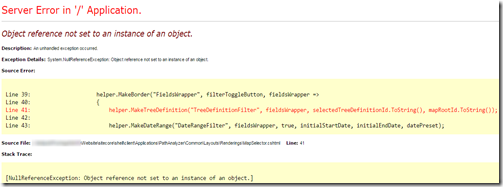
When I
try to run Path Analyzer for the first time, I get an error in the
MapSelector.cshtml file, line 41: Object
reference not set to an instance of an object.
helper.MakeTreeDefinition("TreeDefinitionFilter",
fieldsWrapper, selectedTreeDefinitionId.ToString(), mapRootId.ToString());
The issue, in my
case, was with the mapRootId object. That parameter is empty when
launching the Path Analyzer, so the function that looks for this value finds
nothing. This happens a few lines earlier, on line 32:
var mapRootId = parametersHelper.GetMapRootId();
The
main problem is that GetMapRootId() is retuning a null value
from this command, when that param doesn’t exist. You can see this by
decompiling Sitecore.PathAnalyzer.Client.dll. Instead, what that command
should be doing is returning Sitecore.Data.ID.Null.
A quick fix for this
is to update your MapSelector.cshtml file’s line 32 to:
var mapRootId = parametersHelper.GetMapRootId() ??
Sitecore.Data.ID.Null;
This is not a great long term solution, since any
Sitecore update may replace this change. However, one would expect that
there will be an updated version of this page that does not rely on Silverlight
in the future anyways, so this can work as a temporary patch for you.
The full text of the
error is:
Server Error in '/' Application.
Object reference
not set to an instance of an object.
Description: An unhandled exception occurred.
Exception Details: System.NullReferenceException:
Object reference not set to an instance of an object.
Source Error:
Line 39:
helper.MakeBorder("FieldsWrapper", filterToggleButton,
fieldsWrapper =>
Line 40: {
Line 41:
helper.MakeTreeDefinition("TreeDefinitionFilter",
fieldsWrapper, selectedTreeDefinitionId.ToString(),
mapRootId.ToString());
Line 42:
Line 43:
helper.MakeDateRange("DateRangeFilter", fieldsWrapper, true,
initialStartDate, initialEndDate, datePreset);
Stack Trace:
[NullReferenceException: Object reference not set to
an instance of an object.]
ASP.<>c__DisplayClassa.b__5(String
fieldsWrapper) in c:\inetpub\Sitecore\Website\sitecore\shell\client\Applications\PathAnalyzer\Common\Layouts\Renderings\MapSelector.cshtml:41
Sitecore.PathAnalyzer.Client.Sitecore.Shell.Client.Applications.PathAnalyzer.Common.Layouts.Renderings.Shared.RenderingHelper.MakeBorder(String
controlId, String parent, Action`1 nextControl, String isVisible, Boolean
usePadding, String contentAlignment) +43
ASP.<>c__DisplayClassa.b__4(String
filterToggleButton) in
c:\inetpub\Sitecore\Website\sitecore\shell\client\Applications\PathAnalyzer\Common\Layouts\Renderings\MapSelector.cshtml:39
Sitecore.PathAnalyzer.Client.Sitecore.Shell.Client.Applications.PathAnalyzer.Common.Layouts.Renderings.Shared.RenderingHelper.MakeDropDownButton(String
controlId, String parent, String textDictionaryKey, Boolean showArrow, Action`1
nextControl) +54
ASP.<>c__DisplayClassa.b__3(String
filterToggleButtonColumnPanel) in
c:\inetpub\Sitecore\Website\sitecore\shell\client\Applications\PathAnalyzer\Common\Layouts\Renderings\MapSelector.cshtml:37
Sitecore.PathAnalyzer.Client.Sitecore.Shell.Client.Applications.PathAnalyzer.Common.Layouts.Renderings.Shared.RenderingHelper.MakeColumn(String
controlId, String parent, Int32 gridColumns, Action`1 nextControl)
+52
ASP.<>c__DisplayClassa.b__2(String
rowPanel) in
c:\inetpub\Sitecore\Website\sitecore\shell\client\Applications\PathAnalyzer\Common\Layouts\Renderings\MapSelector.cshtml:36
Sitecore.PathAnalyzer.Client.Sitecore.Shell.Client.Applications.PathAnalyzer.Common.Layouts.Renderings.Shared.RenderingHelper.MakeRow(String
controlId, String parent, Boolean usePadding, Action`1 nextControl)
+52
ASP.<>c__DisplayClassa.b__1(String
contentWrapper) in
c:\inetpub\Sitecore\Website\sitecore\shell\client\Applications\PathAnalyzer\Common\Layouts\Renderings\MapSelector.cshtml:35
Sitecore.PathAnalyzer.Client.Sitecore.Shell.Client.Applications.PathAnalyzer.Common.Layouts.Renderings.Shared.RenderingHelper.MakeBorder(String
controlId, String parent, Action`1 nextControl, String isVisible, Boolean
usePadding, String contentAlignment) +43
ASP.<>c__DisplayClass8.b__0(TextWriter
__razor_helper_writer) in
c:\inetpub\Sitecore\Website\sitecore\shell\client\Applications\PathAnalyzer\Common\Layouts\Renderings\MapSelector.cshtml:34
System.Web.WebPages.WebPageBase.Write(HelperResult result)
+85
ASP._Page_sitecore_shell_client_Applications_PathAnalyzer_Common_Layouts_Renderings_MapSelector_cshtml.Execute()
in
c:\inetpub\Sitecore\Website\sitecore\shell\client\Applications\PathAnalyzer\Common\Layouts\Renderings\MapSelector.cshtml:18
System.Web.WebPages.WebPageBase.ExecutePageHierarchy() +234
System.Web.Mvc.WebViewPage.ExecutePageHierarchy() +123
System.Web.WebPages.WebPageBase.ExecutePageHierarchy(WebPageContext
pageContext, TextWriter writer, WebPageRenderingBase startPage) +121
System.Web.Mvc.Html.PartialExtensions.Partial(HtmlHelper htmlHelper,
String partialViewName, Object model, ViewDataDictionary viewData) +126
Sitecore.Mvc.Presentation.ViewRenderer.Render(TextWriter writer) +220
[InvalidOperationException: Error
while rendering view:
'/sitecore/shell/client/Applications/PathAnalyzer/Common/Layouts/Renderings/MapSelector.cshtml'
(model: 'Sitecore.Mvc.Presentation.RenderingModel, Sitecore.Mvc').
]
Sitecore.Mvc.Presentation.ViewRenderer.Render(TextWriter writer)
+704
Sitecore.Mvc.Pipelines.Response.RenderRendering.ExecuteRenderer.Render(Renderer
renderer, TextWriter writer, RenderRenderingArgs args) +31
Sitecore.Mvc.Pipelines.Response.RenderRendering.ExecuteRenderer.Process(RenderRenderingArgs
args) +75
(Object , Object[] ) +74
Sitecore.Pipelines.CorePipeline.Run(PipelineArgs args) +480
Sitecore.Mvc.Pipelines.PipelineService.RunPipeline(String pipelineName,
TArgs args) +184
Sitecore.Mvc.Pipelines.Response.RenderPlaceholder.PerformRendering.Render(String
placeholderName, TextWriter writer, RenderPlaceholderArgs args) +224
(Object , Object[] ) +74
Sitecore.Pipelines.CorePipeline.Run(PipelineArgs args) +480
Sitecore.Mvc.Pipelines.PipelineService.RunPipeline(String pipelineName,
TArgs args) +184
Sitecore.Mvc.Helpers.SitecoreHelper.Placeholder(String placeholderName)
+267
Sitecore.Web.UI.Controls.Containers.Borders.Border.RenderPlaceHolder(HtmlTextWriter
output) +59
Sitecore.Web.UI.Controls.Containers.Borders.Border.Render(HtmlTextWriter
output) +86
Sitecore.Web.UI.Controls.ComponentBase.Render() +127
Sitecore.Web.UI.Controls.Containers.Borders.ControlsExtension.Border(Controls
controls, Rendering rendering) +112
ASP._Page_sitecore_shell_client_Business_Component_Library_Layouts_Renderings_Containers_Borders_Border_cshtml.Execute()
in c:\inetpub\Sitecore\Website\sitecore\shell\client\Business Component
Library\Layouts\Renderings\Containers\Borders\Border.cshtml:4
System.Web.WebPages.WebPageBase.ExecutePageHierarchy()
+235
System.Web.Mvc.WebViewPage.ExecutePageHierarchy() +124
System.Web.WebPages.WebPageBase.ExecutePageHierarchy(WebPageContext
pageContext, TextWriter writer, WebPageRenderingBase startPage) +122
System.Web.Mvc.Html.PartialExtensions.Partial(HtmlHelper htmlHelper,
String partialViewName, Object model, ViewDataDictionary viewData)
+127
Sitecore.Mvc.Presentation.ViewRenderer.Render(TextWriter writer) +221
[InvalidOperationException: Error
while rendering view: '/sitecore/shell/client/Business Component
Library/Layouts/Renderings/Containers/Borders/Border.cshtml' (model:
'Sitecore.Mvc.Presentation.RenderingModel, Sitecore.Mvc').
]
Sitecore.Mvc.Presentation.ViewRenderer.Render(TextWriter writer)
+704
Sitecore.Mvc.Pipelines.Response.RenderRendering.ExecuteRenderer.Render(Renderer
renderer, TextWriter writer, RenderRenderingArgs args) +31
Sitecore.Mvc.Pipelines.Response.RenderRendering.ExecuteRenderer.Process(RenderRenderingArgs
args) +75
(Object , Object[] ) +74
Sitecore.Pipelines.CorePipeline.Run(PipelineArgs args) +480
Sitecore.Mvc.Pipelines.PipelineService.RunPipeline(String pipelineName,
TArgs args) +184
Sitecore.Mvc.Pipelines.Response.RenderPlaceholder.PerformRendering.Render(String
placeholderName, TextWriter writer, RenderPlaceholderArgs args) +224
(Object , Object[] ) +74
Sitecore.Pipelines.CorePipeline.Run(PipelineArgs args) +480
Sitecore.Mvc.Pipelines.PipelineService.RunPipeline(String pipelineName,
TArgs args) +184
Sitecore.Mvc.Helpers.SitecoreHelper.Placeholder(String placeholderName)
+267
ASP._Page_sitecore_shell_client_Business_Component_Library_Layouts_Renderings_Structures_Substructures_ApplicationContentM_cshtml.Execute()
in c:\inetpub\Sitecore\Website\sitecore\shell\client\Business Component
Library\Layouts\Renderings\Structures\Substructures\ApplicationContentM.cshtml:7
System.Web.WebPages.WebPageBase.ExecutePageHierarchy()
+235
System.Web.Mvc.WebViewPage.ExecutePageHierarchy() +124
System.Web.WebPages.WebPageBase.ExecutePageHierarchy(WebPageContext
pageContext, TextWriter writer, WebPageRenderingBase startPage) +122
System.Web.Mvc.Html.PartialExtensions.Partial(HtmlHelper htmlHelper,
String partialViewName, Object model, ViewDataDictionary viewData)
+127
Sitecore.Mvc.Presentation.ViewRenderer.Render(TextWriter writer) +221
[InvalidOperationException: Error
while rendering view: '/sitecore/shell/client/Business Component
Library/Layouts/Renderings/Structures/Substructures/ApplicationContentM.cshtml'
(model: 'Sitecore.Mvc.Presentation.RenderingModel, Sitecore.Mvc').
]
Sitecore.Mvc.Presentation.ViewRenderer.Render(TextWriter writer)
+704
Sitecore.Mvc.Pipelines.Response.RenderRendering.ExecuteRenderer.Render(Renderer
renderer, TextWriter writer, RenderRenderingArgs args) +31
Sitecore.Mvc.Pipelines.Response.RenderRendering.ExecuteRenderer.Process(RenderRenderingArgs
args) +75
(Object , Object[] ) +74
Sitecore.Pipelines.CorePipeline.Run(PipelineArgs args) +480
Sitecore.Mvc.Pipelines.PipelineService.RunPipeline(String pipelineName,
TArgs args) +184
Sitecore.Mvc.Pipelines.Response.RenderPlaceholder.PerformRendering.Render(String
placeholderName, TextWriter writer, RenderPlaceholderArgs args) +224
(Object , Object[] ) +74
Sitecore.Pipelines.CorePipeline.Run(PipelineArgs args) +480
Sitecore.Mvc.Pipelines.PipelineService.RunPipeline(String pipelineName,
TArgs args) +184
Sitecore.Mvc.Helpers.SitecoreHelper.Placeholder(String placeholderName)
+267
ASP._Page_sitecore_shell_client_Business_Component_Library_Layouts_Renderings_Structures_Page_Structures_Application_Dashboard_cshtml.Execute()
in c:\inetpub\Sitecore\Website\sitecore\shell\client\Business Component
Library\Layouts\Renderings\Structures\Page
Structures\Application\Dashboard.cshtml:14
System.Web.WebPages.WebPageBase.ExecutePageHierarchy() +235
System.Web.Mvc.WebViewPage.ExecutePageHierarchy() +124
System.Web.WebPages.WebPageBase.ExecutePageHierarchy(WebPageContext
pageContext, TextWriter writer, WebPageRenderingBase startPage) +122
System.Web.Mvc.Html.PartialExtensions.Partial(HtmlHelper htmlHelper,
String partialViewName, Object model, ViewDataDictionary viewData)
+127
Sitecore.Mvc.Presentation.ViewRenderer.Render(TextWriter writer) +221
[InvalidOperationException: Error
while rendering view: '/sitecore/shell/client/Business Component
Library/Layouts/Renderings/Structures/Page
Structures/Application/Dashboard.cshtml' (model:
'Sitecore.Mvc.Presentation.RenderingModel, Sitecore.Mvc').
]
Sitecore.Mvc.Presentation.ViewRenderer.Render(TextWriter writer)
+704
Sitecore.Mvc.Pipelines.Response.RenderRendering.ExecuteRenderer.Render(Renderer
renderer, TextWriter writer, RenderRenderingArgs args) +31
Sitecore.Mvc.Pipelines.Response.RenderRendering.ExecuteRenderer.Process(RenderRenderingArgs
args) +75
(Object , Object[] ) +74
Sitecore.Pipelines.CorePipeline.Run(PipelineArgs args) +480
Sitecore.Mvc.Pipelines.PipelineService.RunPipeline(String pipelineName,
TArgs args) +184
Sitecore.Mvc.Pipelines.Response.RenderPlaceholder.PerformRendering.Render(String
placeholderName, TextWriter writer, RenderPlaceholderArgs args) +224
(Object , Object[] ) +74
Sitecore.Pipelines.CorePipeline.Run(PipelineArgs args) +480
Sitecore.Mvc.Pipelines.PipelineService.RunPipeline(String pipelineName,
TArgs args) +184
Sitecore.Mvc.Helpers.SitecoreHelper.Placeholder(String placeholderName)
+267
ASP._Page_sitecore_shell_client_Speak_Layouts_Layouts_Speak_Layout_cshtml.Execute()
in
c:\inetpub\Sitecore\Website\sitecore\shell\client\Speak\Layouts\Layouts\Speak-Layout.cshtml:28
System.Web.WebPages.WebPageBase.ExecutePageHierarchy() +235
System.Web.Mvc.WebViewPage.ExecutePageHierarchy() +124
System.Web.WebPages.WebPageBase.ExecutePageHierarchy(WebPageContext
pageContext, TextWriter writer, WebPageRenderingBase startPage) +122
System.Web.Mvc.Html.PartialExtensions.Partial(HtmlHelper htmlHelper,
String partialViewName, Object model, ViewDataDictionary viewData)
+127
Sitecore.Mvc.Presentation.ViewRenderer.Render(TextWriter
writer) +221
[InvalidOperationException: Error
while rendering view:
'/sitecore/shell/client/Speak/Layouts/Layouts/Speak-Layout.cshtml' (model:
'Sitecore.Mvc.Presentation.RenderingModel, Sitecore.Mvc').
]
Sitecore.Mvc.Presentation.ViewRenderer.Render(TextWriter
writer) +704
Sitecore.Mvc.Pipelines.Response.RenderRendering.ExecuteRenderer.Render(Renderer
renderer, TextWriter writer, RenderRenderingArgs args) +31
Sitecore.Mvc.Pipelines.Response.RenderRendering.ExecuteRenderer.Process(RenderRenderingArgs
args) +75
(Object , Object[] ) +74
Sitecore.Pipelines.CorePipeline.Run(PipelineArgs args) +480
Sitecore.Mvc.Pipelines.PipelineService.RunPipeline(String pipelineName,
TArgs args) +184
Sitecore.Mvc.Presentation.RenderingView.Render(ViewContext
viewContext, TextWriter writer) +321
System.Web.Mvc.ViewResultBase.ExecuteResult(ControllerContext context)
+365
System.Web.Mvc.ControllerActionInvoker.InvokeActionResultFilterRecursive(IList`1
filters, Int32 filterIndex, ResultExecutingContext preContext,
ControllerContext controllerContext, ActionResult actionResult) +90
System.Web.Mvc.ControllerActionInvoker.InvokeActionResultFilterRecursive(IList`1
filters, Int32 filterIndex, ResultExecutingContext preContext,
ControllerContext controllerContext, ActionResult actionResult) +833
System.Web.Mvc.ControllerActionInvoker.InvokeActionResultFilterRecursive(IList`1
filters, Int32 filterIndex, ResultExecutingContext preContext,
ControllerContext controllerContext, ActionResult actionResult) +833
System.Web.Mvc.ControllerActionInvoker.InvokeActionResultWithFilters(ControllerContext
controllerContext, IList`1 filters, ActionResult actionResult) +81
System.Web.Mvc.ControllerActionInvoker.InvokeAction(ControllerContext
controllerContext, String actionName) +635


